 Roomy
Roomy
Photo & video cleaner for iPhone
Your library is mostly the same photo.
Roomy scans the photos and videos already on your iPhone once, groups what repeats, and hands the decision back to you. Nothing is removed until you tap Delete.
Free to download · Nothing is deleted without your confirmation · Roomy Pro is an auto-renewing subscription
Media check
One scan, four lists.
The scan runs on your iPhone and finishes with a count next to each category. You open the one you want and work through it — nothing is selected across categories behind your back.
- Similar photos — near-identical frames, grouped
- Duplicate photos — exact copies of the same image
- Screenshots — receipts, maps, half a conversation
- Videos — the heaviest items in most libraries
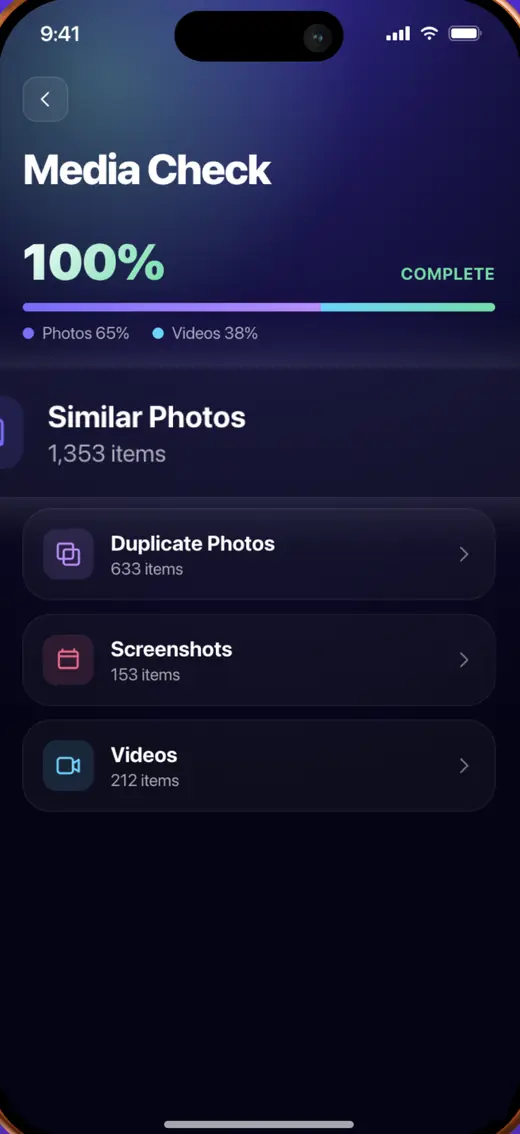
Media Check, straight from the app
Similar photos
Eight tries at one good shot.
Frames taken seconds apart, when you were trying to get one that worked. Roomy groups them and marks one Best. That is a suggestion — tap a different frame and it becomes the one that stays.
- Everything except the kept frame comes pre-selected
- Deselect All on any group to choose by hand
- The button names the number of items before you press it
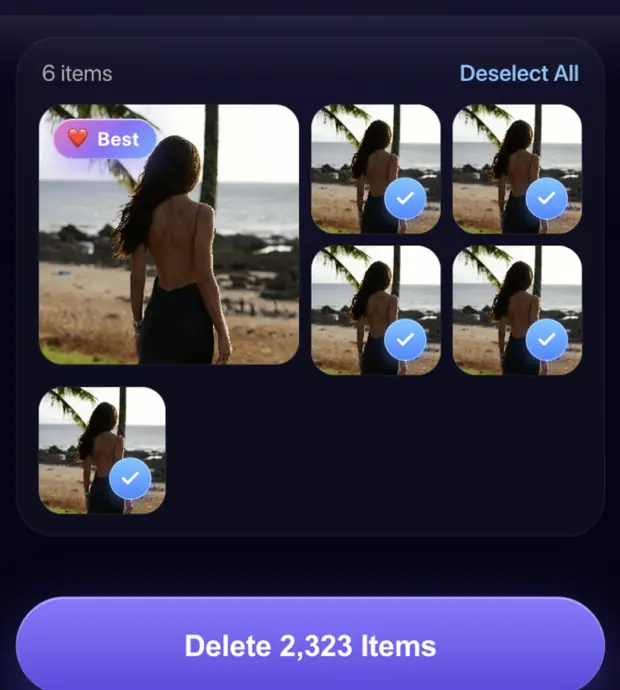
A group of six, one kept
Compress videos
Keep the clip, drop the weight.
Pick a video, choose a quality preset, and Roomy shows the estimated result next to the original size before you commit. How much it saves depends on the clip — the app tells you, it does not promise a figure.
- Three presets, with the estimate shown for each
- The original size and the estimate side by side
- Nothing is written until you tap Compress

Estimate shown before you commit
Also in the app
Three more things it does.
Duplicates
Exact copies of the same image — saved twice from a chat, re-downloaded from a message, exported again from an editor. Matched and pre-selected except one.
Screenshots
Every screen capture in one list. Nothing in it is a memory, which makes it the fastest first pass in the app.
Remove background
Add a photo and Roomy separates the subject from the background, with a slider to compare the result against the original before you keep it.
Worth knowing first
Deleted photos go to Recently Deleted.
When you confirm a deletion, Roomy asks iOS to remove those items. iOS does not erase them immediately — it moves them to the Recently Deleted album, where the system keeps them for around 30 days before removing them for good.
Two things follow. Anything you regret can be restored from Photos → Albums → Recently Deleted for the next month. And your free storage will not go up until that album is emptied, which you do yourself in the Photos app — no third-party app is allowed to empty it for you.
Subscription
What you pay, and how to stop paying.
Auto-renewing subscription
- Full access to every cleaning tool
- Unlimited review of photos and videos
- Video compression and background removal
- Renews automatically until cancelled
Shown before you confirm
- The price and period for your country appear in the app and on the App Store before purchase
- Apple sets the local amount and currency
- Where a free trial is offered, its length is stated at the same place
- Roomy is free to download. Full access is sold as an auto-renewable subscription through your Apple Account.
- Payment is charged at confirmation of purchase, or at the end of a free trial period if the offer you take starts with one.
- The subscription renews automatically for the same period unless cancelled at least 24 hours before the current period ends. Renewal is charged within 24 hours before that moment.
- If you buy a subscription while a free trial is running, the unused part of the trial is forfeited and does not resume.
- Cancel in Settings → your name → Subscriptions on your iPhone. Cancelling stops the next charge; access continues to the end of the period you already paid for.
- Deleting the app does not cancel the subscription. It keeps renewing until you cancel it in your Apple Account settings.
- Purchases are processed by Apple, so refunds are requested from Apple at reportaproblem.apple.com. We cannot issue or reverse a charge ourselves, but write to support@roomycleaner.com and we will help you put the request together.
Full conditions are in the Terms of Use. What data is involved is in the Privacy Policy.
Common questions
Before you install it.
Does Roomy upload my photos?
No. The scan, the grouping and the comparison run on your iPhone through Apple's Photos framework. Your library is not sent to a server of ours. What the app does collect — subscription and technical data through the services it uses — is listed in the Privacy Policy.
I deleted a lot and my storage barely changed.
The items are in Photos → Albums → Recently Deleted, where iOS keeps them for around 30 days and where they still occupy space. Empty that album to get the room back immediately. Only you can do it — no third-party app is permitted to.
Does Roomy speed up my iPhone?
No, and no iOS app can. iOS does not let third-party apps clear system caches, manage memory or touch other apps' data. Roomy works on one thing: the photos and videos in your own library.
How much space will it free up?
That depends entirely on what is in your library, and we do not put a figure on it. The app shows you the count in each category after the scan, and the number of items on the delete button before you press it.
A group shows photos that are not identical.
The similar-photo grouping is a suggestion based on how close the frames look, not a verdict. Deselect anything you want to keep, or use Deselect All and pick by hand. Nothing is deleted because it was grouped — only because it was selected when you tapped the button.
More answers, and a person who replies, on the support page.
Start with the screenshots.
Nothing in that list is a memory, and it is usually the fastest way to see how much of your library you have been carrying without meaning to.